Maia Foundation runner overview🔗
The Maia Foundation runner is a component within the Maia ecosystem. It serves as a bridge between the user's data plane and the centralized platform, enabling the execution and scheduling of compatible pipelines.
Here is a summary of Maia Foundation runner's key characteristics:
- Execution and scheduling: The Maia Foundation runner enables the execution of pipelines within Maia. It acts as the engine that carries out the tasks defined in the pipelines.
- Data locality: Your data will remain in the region your Maia Foundation runner is running in, allowing you to conform to data locality limitations set by your organization or law.
- Scalability: The Maia Foundation runner can scale up by running multiple instances concurrently, allowing for increased workload handling based on the user's requirements.
Note
You need a Streaming runner to run Streaming pipelines. This agent type has its own architecture considerations and installation procedure, which are covered under Create a Streaming runner
Video example🔗
Expand this box to watch our video about the Maia Foundation runner.
Video
Architecture🔗
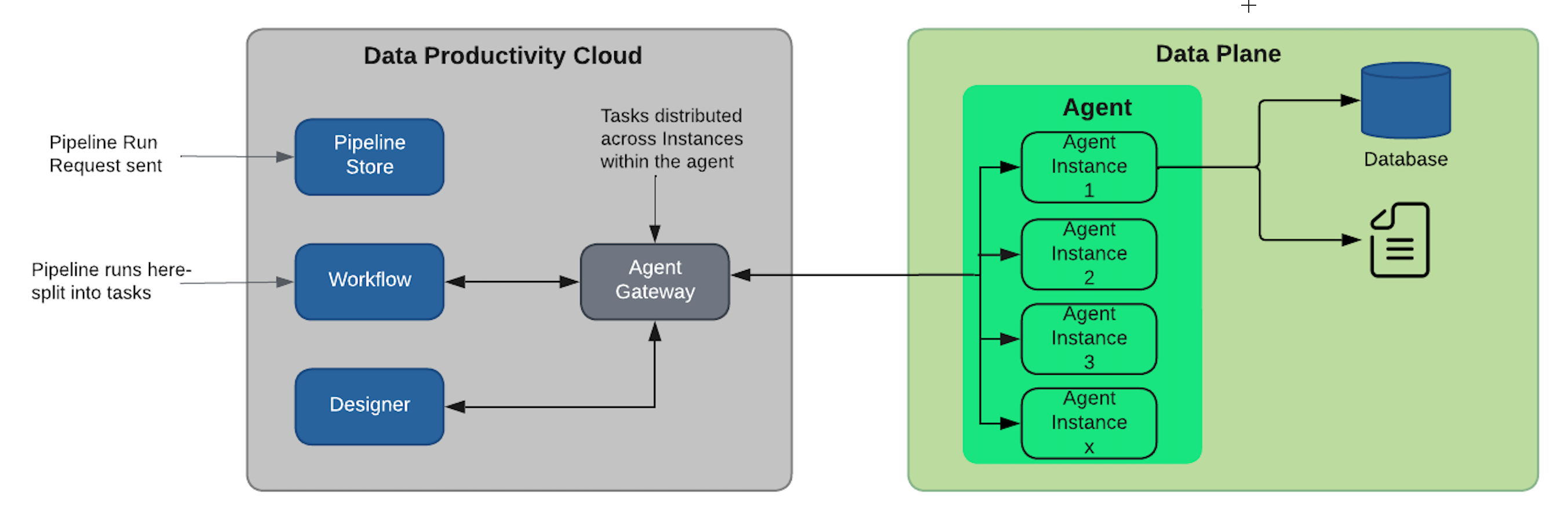
The Maia Foundation runner is required for Designer to schedule and execute the pipelines you create. While Maia Foundation runners can be installed manually on your cloud platform, a Matillion Full SaaS deployment is provided for you when you create your first Designer project and this Maia Foundation runner (hosted by Matillion) can be seen from the Manage Agents page in Maia. Thus, you don't need to install your own Maia Foundation runner if you don't want to.
The Maia Foundation runner is based on Ubuntu Linux and deployed to supported runtimes, including AWS and Azure.
What is a data plane?🔗
A data plane refers to an abstract concept that represents an execution environment. This execution environment, such as AWS Fargate, is used in conjunction with a Maia Foundation runner provided by Matillion as a Docker image.
The data plane serves as the infrastructure or environment where the Maia Foundation runner instances operate. The Maia Foundation runner instances, when deployed within the data plane, collectively form the Maia Foundation runner. Each Maia Foundation runner instance is responsible for executing individual pipeline tasks.
These pipeline tasks typically involve interactions with various data sources, including a data warehouse. The data plane provides the necessary resources and infrastructure for the Maia Foundation runner instances to execute the assigned pipeline tasks and perform data-related operations.
What is the Maia Foundation runner?🔗
The Maia Foundation runner is a software component responsible for executing the pipeline tasks within the specified environment. It serves as the execution engine for the pipelines and interacts with the agent gateway to receive the pipeline tasks that need to be executed. The Maia Foundation runner communicates with the agent gateway using an egress-only method, meaning it can send requests and receive responses but can't accept incoming connections.
The pipeline tasks that are sent to the Maia Foundation runner originate from Maia platform. These tasks define the specific operations and transformations to be performed on the data within the pipeline.
What is Maia agent manager?🔗
The agent manager is an application or tool that facilitates the creation, configuration, and management of Maia Foundation runners within Maia ecosystem. It is typically accessed through Maia, where you can manage various aspects of the data pipelines.
With the agent manager, users can create and define configurations for installing and deploying Maia Foundation runners. This includes specifying settings such as the Maia Foundation runner image, environment variables, resource allocation, and any other required parameters. The agent manager provides a user-friendly interface or set of commands to simplify the process of configuring and setting up Maia Foundation runners.
Note
The agent manager offers functionality for managing Maia Foundation runners in compatible environments like AWS ECS Fargate. This includes features such as automatic updates, where the agent manager handles the process of updating Maia Foundation runners to newer versions seamlessly. This ensures that Maia Foundation runners deployed in compatible environments remain up to date with the latest features, bug fixes, and security patches. This means Maia Foundation runner updates are controlled by Matillion, and as such, the user isn't required to manually update the Maia Foundation runner themselves.
Matillion Full SaaS vs Hybrid SaaS🔗
Maia provides two deployment models: Full SaaS and Hybrid SaaS.
- With Full SaaS, Matillion manages the entire infrastructure, including Maia Foundation runner deployment and security measures. Matillion ensures seamless updates and robust security protocols. The Matillion-hosted Maia Foundation runner handles the execution of tasks, and customer secrets are securely stored in a Matillion-hosted secrets manager.
- With Hybrid SaaS, you deploy and manage your own Maia Foundation runners within your own cloud infrastructure. This gives you full control over security measures, network isolation, access control, and where your secrets are stored. This option is available for Enterprise edition customers only.
Regardless of the deployment model, your data remains secure at all times and is never visible to Matillion. Read Security overview for a more detailed explanation of Matillion's security framework.
Each deployment model offers distinct features and benefits, allowing organizations to choose the option that best aligns with their needs and infrastructure preferences. Each deployment model also comes with its own security considerations. For a full discussion of the deployment architecture and security considerations, read Deployment options.
Every Maia account includes a Full SaaS Maia Foundation runner, hosted by Matillion, offering a zero-install and zero-maintenance experience. By starting with Full SaaS, you can quickly leverage Maia's capabilities without any setup. As your requirements become more sophisticated, you can move to the Hybrid SaaS model and customize it to your unique infrastructure, if you wish.
Due to considerations such as security and data flow, some pipeline components can only be used in a Hybrid SaaS environment. This will be clearly stated in the component documentation. Components that are currently only available in Hybrid SaaS include:
- Custom JDBC drivers.
- SAP ODP.
- NetSuite SuiteAnalytics.
- Bash Script.
- Python Script. Use Python Pushdown instead in a Full SaaS deployment (Snowflake only).
Matillion Full SaaS🔗
Every Matillion Maia account is provided with a Maia Foundation runner hosted by Matillion, providing a true zero-install experience.
If your projects are set up to use Matillion's Full SaaS infrastructure then there is no need to be concerned with managing the Maia Foundation runner–this is handled by Matillion.
There's no setup needed for a Full SaaS solution—it's available for you to use straight away.
If you need to allow any access from the Matillion Full SaaS Maia Foundation runner to your data plane, you'll find the IP addresses here.
Warning
Certain pipeline components, listed above, are not available for use in a Full Saas deployment. In addition, some cloud-specific components (for example, AWS SNS Message and SQS Message), as well as data ingestion and staging operations, may require extra work in setting up cloud provider credentials and ensuring that your cloud data warehouse has the appropriate access permissions.
Hybrid SaaS🔗
If your account is on our Enterprise plan, you also have the option to install our Maia Foundation runner software within your own cloud infrastructure and data plane. This is may be beneficial if:
- Your data locality requirements need the Maia Foundation runner to run in a specific region that Matillion doesn't currently provide Maia Foundation runners in.
- You aim to achieve faster processing speeds by locating the Maia Foundation runner close to your applications, databases, and cloud data warehouse.
- You need to access systems (such as database or file storage) that only have network access from within your VPC/VNet.
- You have specific Maia Foundation runner scaling requirements that a Matillion Full SaaS Maia Foundation runner doesn't support.
- You need to use any of the Hybrid SaaS pipeline components listed above.
Currently, Maia allows Maia Foundation runners to be hosted in AWS, Azure, or Snowflake infrastructure. Instructions for hosting a Maia Foundation runner in your own cloud infrastructure are given in Create a Maia Foundation runner in your infrastructure.
You can choose to have the Maia Foundation runner update automatically when a new version is released by Matillion, or you can manually control the updating of your Maia Foundation runners. Read Maia Foundation runner updates for details.
Migrating from Full SaaS to Hybrid SaaS🔗
Projects are either Full SaaS or Hybrid SaaS, and can't switch between the two. If you want to move Full SaaS workloads to Hybrid SaaS infrastructure, you need to perform the following steps:
- Install the Hybrid SaaS Maia Foundation runner in your infrastructure.
- Create a new project that uses your Hybrid SaaS Maia Foundation runner.
- Recreate any secrets in the new project.
- Export and Import the pipelines from the Full SaaS project to your new Hybrid SaaS project.
- Recreate any schedules in the new project.
Maia Foundation runner version tracks🔗
In a Hybrid SaaS deployment, it's important that you always use a currently supported version of the Maia Foundation runner, which means you will be required to update your Maia Foundation runner from time to time. As we recognize that it's not always possible or convenient to update as soon as a new Maia Foundation runner version is released, we offer a choice of release cadences, which we call version tracks. The choices are Current and Stable:
- Current: Supports the latest Maia features and has a faster cadence for releases. This is usually twice a week, typically on a Tuesday and Thursday, though this may vary. These releases may include new features, bug fixes, and security patches. This track is ideal if you want to access the latest features as soon as they are available, and are able to update your Maia Foundation runner frequently.
- Stable: Has a slower, more predictable cadence for releases. This is once per month, on the 1st of the month. Features added to a Stable release have previously been available on a Current release. We take a cut of the Current track on the first day of each month, and after a period of testing and verification we release this as the Stable version on the first day of the subsequent month. This means that any new features in a Stable release have been available for at least one month on the Current track.
If you need to change the track that an existing Maia Foundation runner is on, you can use the Update a Maia Foundation runner public API endpoint. However, take note of the following:
- Changing the Maia Foundation runner's version track does not update the Maia Foundation runner itself. You must update the image URI for the Maia Foundation runner service in your cloud provider. If you don't, the Maia Foundation runner version may show as "Out of support".
- If you change the Maia Foundation runner state from Current to Stable and update the installed Maia Foundation runner service, pipelines created using a newer (Current) Maia Foundation runner version might not run as expected on an older (Stable) version.
Choose the track which suits your needs, or even use a combination of different tracks for different Maia Foundation runners. For example, this would allow you to run your production Maia Foundation runners on the Stable track, and run your test or development Maia Foundation runners on the Current track, giving you a month to undertake testing and verification of a Current version before it's adopted as Stable.
The decision between choosing the Current or Stable tracks should be based on how the Maia Foundation runner update cadence fits with your operational practices, and how eager you are to take advantage of new features.
You choose the Maia Foundation runner's version track when you first create the Maia Foundation runner. If you have multiple Maia Foundation runners, they can be on different version tracks.
Critical security patches are always applied to the supported Maia Foundation runner releases on both tracks.
Due to the nature of the Snowflake Native App release process, Maia Foundation runner for Snowflake can only use the Stable version track.
The Matillion-hosted Full SaaS Maia Foundation runner is on the Current version track, and so always uses the latest available Maia Foundation runner version.
Read Maia Foundation runner updates for details of how to update your Maia Foundation runner.